
Compare the permissions in profiles and permission sets between orgs and update the permission in each org to make the identical. The name of the profile and permission set needs to be the same in both compared orgs.
List the permission sets and muting permission sets in permission set groups
Click on link to navigate to page to compare permission for each section. The title link and number of assignment link navigates to Salesforce. Permission sets with namespace can not be edited since these are part of an installed package.

Object and field permissions
Click Object permissions to view list of all objects, clicking row will show the field permissions for selected object. The disabled rows are object which are not permissionable meaning that object permissions can not be given for object but field permissions can be given
Green indicates that all permissions are equal in both source and target org and red means that some permissions are different. Clicking the toggle switch enables the permission. If there are depend permissions (or license does not allow the permission) an error will be given from Salesforce

Error from Salesforce when object permission fails
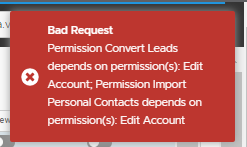
System and app permissions
Click System and app permissions to view list of all system and app permissions for profile or permission set. Click toggle switch to enable / disable permission. If it is not possible to enable / disable permission an error from Salesforce is shown. Editing is disabled for permission sets that have a namespace.

Assignment for Apps, Connected Apps, Apex, VF, Custom Permissions, Custom Settings and Custom Metadata
Assignment for apps, connected apps, Apex, VF pages, customer permissions, customer settings and custom metadata follow the same pattern. The table lists the setup items for source and target org. The cells are rendered grey if the setup item is not found in the corresponding org.
You can add new setup items by searching and selecting item from the dropdown list. Deleting setup item from the org can be done by clicking the Delete button. Editing is disabled for permission sets that have a namespace.

Permission Set Groups
Click in side panel Permission Set groups to see all permission sets and muting permission sets included in permission set group. Muting permission sets are shown as red.
The grey row on either side shows the permission set (or muting) does not exist in the target or for the selected permission set group
Click on the id to navigate to Salesforce or click on the permission set name to navigate to different page to see permissions in the selected permission set

